Yes — you can send photos that appear directly on your partner's iPhone Home Screen.
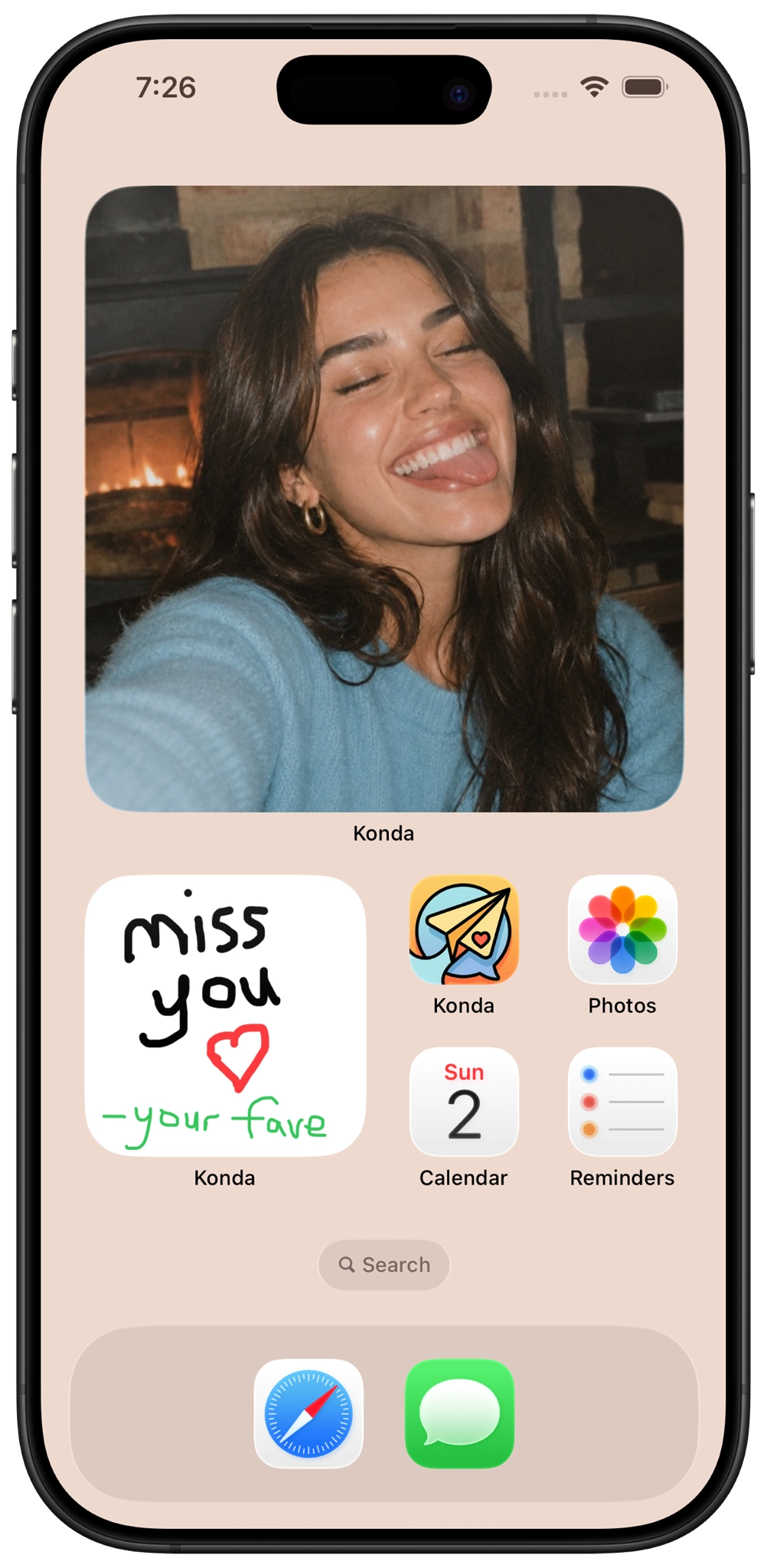
Konda's Photo Frame is a private photo-sharing feature made for couples. Once you and your partner are paired in Konda and the Photo Frame widget is added to the Home Screen, photos you send can appear there for your partner to see throughout the day.
Instead of sending another picture into a normal chat thread, Photo Frame gives that picture a place on your partner's Home Screen.
How to send a photo to your partner's Home Screen
Here's the basic process for sending a photo to your partner's iPhone Home Screen with Konda.
1. Install Konda on both iPhones
Both you and your partner need Konda installed so the app can create your private paired couple space.
You can download Konda from the App Store:
2. Pair with your partner in Konda
Connect your Konda accounts so the app knows who your partner is and where your shared photos and other couple features should go.
Once paired, you can use Konda together for Photo Frame, doodles, daily questions, games, shared countdowns, lists, calendar tools, and other relationship features.
3. Add the Konda Photo Frame widget to the Home Screen
The photo appears on the iPhone Home Screen through Konda's Photo Frame widget, so the receiving partner needs to add the widget to their Home Screen.
To add an iPhone Home Screen widget:
- Touch and hold an empty area of the iPhone Home Screen.
- Choose the option to add a widget.
- Search for Konda.
- Select the Konda Photo Frame widget.
- Add the widget and place it where you want it.
Both partners can add Photo Frame if you want to send photos back and forth to each other's Home Screens.
4. Open Photo Frame in Konda
Open Konda and go to Photo Frame. Choose the photo you want to share with your partner.
It could be a selfie, your pet, something funny you saw, a view from where you are, a memory together, or simply an ordinary part of your day.
5. Send the photo
Send the picture through Photo Frame. The photo can then appear in your partner's Konda widget on their iPhone Home Screen.
Your partner does not need to dig through a message history to find it. The image becomes part of the Home Screen they already see throughout the day.
What is Konda Photo Frame?
Photo Frame is Konda's private photo-sharing feature for couples. Partners can send photos that appear inside a Konda widget on the other person's iPhone Home Screen.
Konda also keeps a private recent Photo Frame history with up to five recent photos from each partner, so you can look back at recent pictures inside the app.
Partners can also react to Photo Frame photos.
Can both partners send photos to each other's Home Screens?
Yes. Konda Photo Frame works both ways.
Once both people are paired, either partner can send photos. If both of you have the Photo Frame widget on your iPhones, you can each receive photos from the other person on your Home Screen.
How do I send a picture to my boyfriend's Home Screen?
If your boyfriend uses Konda and the two of you are paired, add the Konda Photo Frame widget to his iPhone Home Screen and send a picture through Photo Frame.
The picture can then appear inside the Konda widget on his Home Screen.
How do I send a picture to my girlfriend's Home Screen?
The process is the same. Pair your Konda accounts, make sure the Photo Frame widget is added to her iPhone Home Screen, and send your picture using Photo Frame.
Konda is designed specifically for couples, so the photo-sharing experience is between paired partners rather than being a public social feed.
Can I send a photo to someone's Home Screen?
With Konda, you can send photos to the Home Screen of the partner you are paired with in the app.
The photo does not literally replace their iPhone wallpaper or appear over other apps. It appears through the Konda Photo Frame widget that your partner has added to their Home Screen.
That distinction is useful: your partner controls where the widget sits, while you can send new photos for it to display.
Can I send photos to my long-distance partner's Home Screen?
Yes. Photo Frame can be particularly useful for long-distance couples because a new photo from your partner can become part of the Home Screen you see throughout the day.
Konda also includes other features designed to help couples stay connected while apart, including relationship widgets that can show distance, how long you've been together, days until you meet again, and partner mood.
Couples can also use shared countdowns, daily questions and activities, games, date ideas, lists, calendar tools, photos, and doodles.
For more options, see our best apps for long-distance couples .
Can I draw on my partner's Home Screen too?
Yes. Konda also lets couples send doodles that can appear on a partner's iPhone Home Screen.
You can use doodles for simple drawings, handwritten-style messages, hearts, inside jokes, or small sketches.
This gives couples two different ways to send something visual to each other's Home Screens: photos through Photo Frame and drawings through Konda's doodle features.
Why put a partner's photo on your Home Screen?
Messaging and photo widgets serve different purposes.
A message is something you open and respond to. A Home Screen photo can stay visible without requiring any action.
You might see your partner's picture while checking another app, unlocking your iPhone, looking for something on the Home Screen, or simply using your phone during the day.
That can make an ordinary photo feel less like another attachment in a chat and more like a small presence from your partner.
What photos can you send to your partner's Home Screen?
Photo Frame works well for ordinary moments that you want to share with one person rather than post publicly.
- A selfie during the day
- A good-morning or good-night photo
- Your pet doing something funny
- A meal or coffee you want to show your partner
- A view from where you are
- A photo from a date
- A favorite memory together
- An inside joke
- A picture from work, school, or a trip
- A photo from a long-distance visit
What apps let you send photos to someone's Home Screen?
Home Screen photo sharing has become a popular way for couples and close friends to keep visual updates visible without opening a traditional social feed.
Konda approaches the idea specifically for couples. Photo Frame handles partner photos, while Konda also adds doodles, relationship widgets, questions, games, date ideas, countdowns, shared tools, and other couple features.
If you are comparing different photo-widget apps, see our best apps like Locket for couples .
You can also compare more relationship-focused widgets in our best couples widget apps for iPhone guide.
What else can Konda put on your Home or Lock Screen?
Photo Frame is only one of Konda's widget features.
Couples can also use Home Screen widgets for doodles and shared lists.
On the Lock Screen, Konda can display relationship information such as:
- The distance between you and your partner
- How long you've been together
- Days until you meet again
- Your partner's mood
Inside the app, couples can also use daily questions and activities, games and compatibility quizzes, date ideas, shared countdowns, lists, calendar tools, memories, writing and drawing spaces, and virtual pets.
For a broader comparison, see our best couples apps for iPhone .
Put your partner on your Home Screen
Konda lets couples send photos and doodles to each other's Home Screens, use relationship Lock Screen widgets, answer daily questions, play games and quizzes, plan dates, share countdowns, and stay connected in more small ways throughout the day.

Sending photos to your partner's Home Screen FAQ
How can I send a photo to my partner's Home Screen?
With Konda, pair with your partner, add the Konda Photo Frame widget to the iPhone Home Screen, then use Photo Frame in Konda to send a photo. The photo can then appear on your partner's Home Screen through the widget.
What app lets me send pictures to my boyfriend or girlfriend's Home Screen?
Konda lets paired couples send photos that can appear on each other's iPhone Home Screens through the Konda Photo Frame widget. Konda is designed specifically for couples and also includes doodles, relationship widgets, questions, games, date ideas, countdowns, and shared tools.
Can both partners send photos to each other's Home Screens?
Yes. Once a couple is paired in Konda and has set up the Photo Frame widget, each partner can send photos for the other person to see on their Home Screen.
Can I send a photo to my long-distance partner's Home Screen?
Yes. Konda Photo Frame works for couples who are nearby or long distance. Partners can send photos that appear on each other's Home Screens and use other Konda features such as distance widgets, reunion countdowns, questions, games, and doodles.
Can I send drawings to my partner's Home Screen too?
Yes. In addition to photos, Konda lets couples send doodles that can appear on a partner's iPhone Home Screen.
Does Konda keep previous Photo Frame pictures?
Konda keeps a private recent Photo Frame history for the couple, with up to five recent photos from each partner, and partners can react to photos.