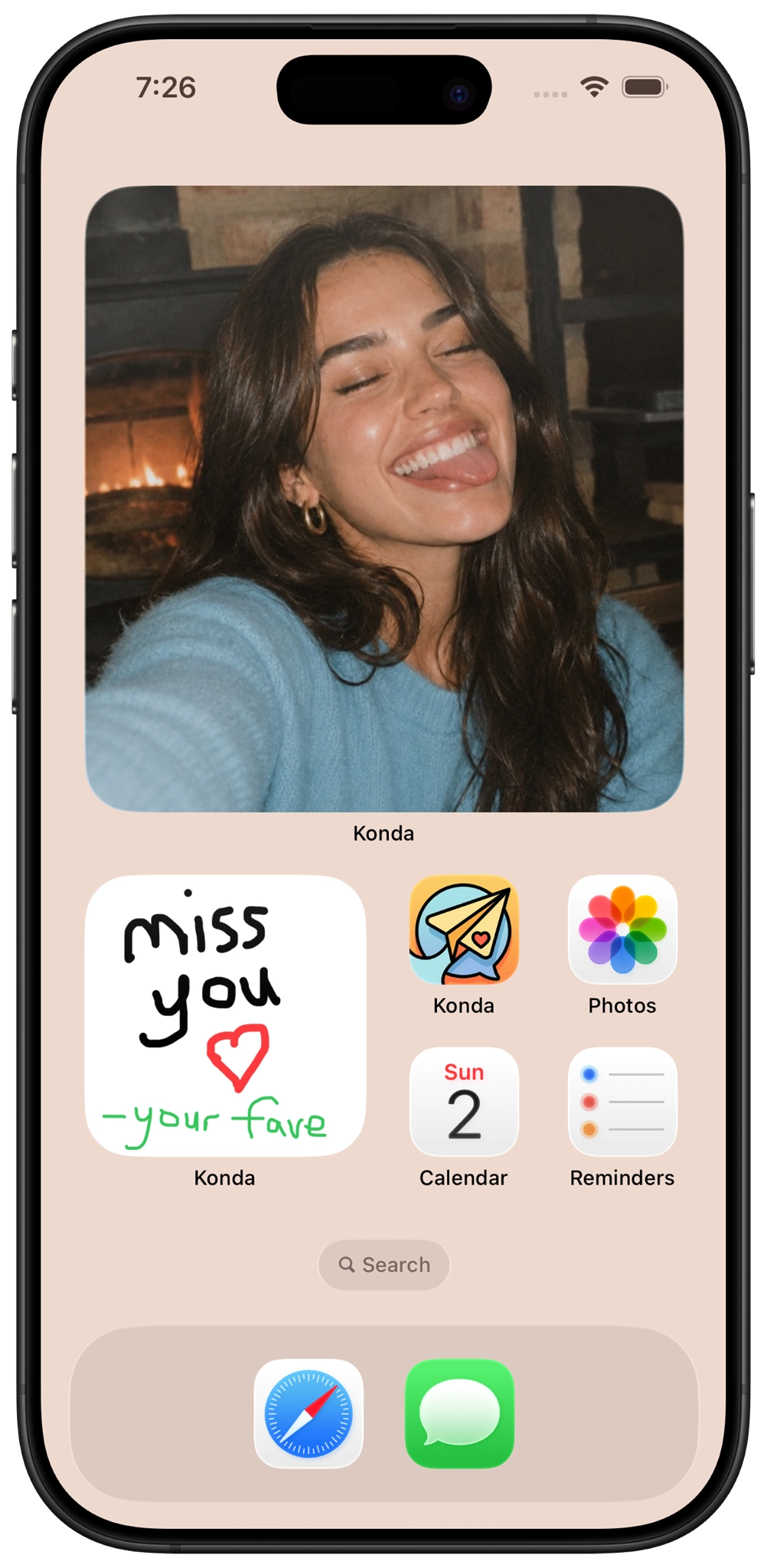
Yes — you can draw something for your partner and send it to their iPhone Home Screen with Konda.
Konda lets couples create doodles and send them directly to each other. Your drawing can appear on your partner's Home Screen, giving you a quick way to leave little sketches, handwritten-style messages, hearts, jokes, or surprises throughout the day.
It works whether you're sitting in the same room or living far apart.
How to draw on your partner's Home Screen
Here's the basic process for sending a doodle to your partner's iPhone Home Screen with Konda.
1. Install Konda on both iPhones
Both you and your partner need Konda installed so you can connect your accounts and share couple features together.
You can download Konda from the App Store:
2. Pair with your partner
Connect your Konda accounts so the app knows which two people are sharing the private couple space.
Once you're paired, you can use Konda together for doodles, Photo Frame photos, daily questions, games, relationship widgets, countdowns, dates, shared lists, and other features.
3. Add the Konda doodle widget to the Home Screen
Add the Konda widget to the iPhone Home Screen where you want drawings from your partner to appear.
To add a widget on iPhone:
- Touch and hold an empty area of the Home Screen.
- Choose the option to add a widget.
- Search for Konda.
- Select the Konda doodle widget.
- Add it to your Home Screen and place it where you want it.
Both partners can add the widget so you can send drawings back and forth.
4. Create a doodle in Konda
Open Konda and create the drawing you want to send.
Your doodle does not need to be complicated. The fun of sending drawings to your partner is that they can be quick, personal, and spontaneous.
Draw a heart, write their nickname, sketch something from your day, make a terrible portrait, leave an inside joke, or just scribble something that will make them smile.
5. Send the doodle to your partner
Send your finished drawing through Konda. Your doodle can then appear on your partner's iPhone Home Screen.
They can see what you sent while using their phone without needing to dig through a normal message conversation first.
Send little drawings throughout the day
A doodle does not need to be important enough for a long conversation. It can just be a tiny sign that you were thinking about your partner.
You could draw a heart before work, leave a quick good-morning message, sketch something funny you saw, or surprise your partner with a new drawing while you're apart.
Konda also lets couples send photos through Photo Frame, so you can switch between drawings and real-life moments.
How do I draw on my boyfriend's Home Screen?
If you and your boyfriend are paired in Konda, set up the Konda doodle widget and create a drawing inside the app.
Send the doodle to him and it can appear on his iPhone Home Screen.
You can use it for little love notes, hearts, jokes, reminders, funny sketches, or something completely random.
How do I draw on my girlfriend's Home Screen?
Pair together in Konda, add the Konda doodle widget to her Home Screen, then create and send your drawing from Konda.
Once sent, your doodle can appear on her Home Screen for her to see during the day.
Can both partners draw on each other's Home Screens?
Yes. Konda is designed for two-way sharing between partners.
Both people can create doodles and send them to each other. If you both have the Konda widget set up, your Home Screens can become a little back-and-forth drawing space for the two of you.
What should I draw on my partner's Home Screen?
The best doodles are usually simple. You do not need to be good at drawing.
In fact, bad drawings can sometimes be more fun.
- A heart with your initials
- A quick “I love you” message
- A good-morning doodle
- A good-night message
- A tiny portrait of your partner
- A badly drawn version of your pet
- An inside joke
- A smiley face
- A countdown to your next date
- A drawing of what you're doing right now
- A little “thinking of you” note
- A funny challenge for them to draw something back
- Or anything else you want to draw
Can long-distance couples draw on each other's Home Screens?
Yes. Sending doodles can be especially fun for long-distance couples because it gives you another small way to show up in your partner's everyday life while you're apart.
A drawing can be much more casual than scheduling a call or starting a long conversation. You can make something in a few seconds and send it whenever you're thinking about your partner.
Konda also includes other features that can be useful for long-distance couples, including Home Screen photos, relationship distance widgets, reunion countdowns, partner moods, daily questions, games, and shared activities.
For more options, see our best apps for long-distance couples .
Can I send photos to my partner's Home Screen too?
Yes. Konda supports both drawings and photos.
Photo Frame lets you send a picture that can appear on your partner's iPhone Home Screen. You can send selfies, pets, memories, funny photos, views from your day, or anything else you want your partner to see.
If you want the full setup guide, read how to send photos to your partner's Home Screen .
Photos or doodles: which should you send?
They work well for different kinds of moments.
A photo is useful when you want to show your partner something real from your day. A doodle is useful when you want to make something just for them.
You might send a photo of your coffee in the morning and then draw a heart later. Or send a photo from your walk and follow it with a terrible sketch of the dog you saw.
Having both options makes the Home Screen less repetitive because what appears there can change between real photos and things your partner drew themselves.
Why send a doodle instead of a normal text?
A text message is efficient, but a drawing feels different because you made it yourself.
Even something as simple as a badly drawn heart or a handwritten “hi” has a little more personality than typing the same thing into a message.
And because the doodle can sit on your partner's Home Screen, they may see it several times throughout the day instead of reading it once and letting it disappear up a chat thread.
What app lets couples send drawings to each other's Home Screens?
Konda is a couples app that lets paired partners send doodles to each other's iPhone Home Screens.
Konda also includes Home Screen photo sharing through Photo Frame, shared-list widgets, and relationship-focused Lock Screen widgets.
Couples can also answer daily questions, complete shared activities, play games and compatibility quizzes, find date ideas, use shared countdowns, maintain lists and calendar events, save memories, and use virtual pets.
For more widget-focused apps, see our best couples widget apps for iPhone .
What else can Konda put on your Home or Lock Screen?
Doodles are only one part of Konda's widget system.
Couples can also put partner photos and shared lists on their Home Screens.
Konda's Lock Screen widgets can show relationship information such as:
- The distance between you and your partner
- How long you've been together
- Days until you meet again
- Your partner's mood
Inside the app, couples can also use daily questions and activities, games and compatibility quizzes, Date Match, date ideas, countdowns, lists, calendar tools, memories, writing and drawing spaces, virtual gifts, and virtual pets.
For a broader comparison, see our best couples apps for iPhone .
Send your partner something you drew
Konda lets couples send doodles and photos to each other's Home Screens, use relationship Lock Screen widgets, answer daily questions, play games and quizzes, find date ideas, share countdowns, and stay connected in more small ways.

Drawing on your partner's Home Screen FAQ
How can I draw on my partner's Home Screen?
With Konda, pair with your partner, set up the Konda doodle widget, create a drawing in Konda, and send it. Your doodle can then appear on your partner's iPhone Home Screen.
What app lets me draw on my boyfriend's Home Screen?
Konda lets paired couples create doodles and send them to each other's iPhone Home Screens. You can use drawings for handwritten-style messages, hearts, inside jokes, sketches, or other small surprises.
What app lets me draw on my girlfriend's Home Screen?
Konda lets you create and send doodles that can appear on your girlfriend's iPhone Home Screen after you pair together and set up the Konda widget.
Can both partners send drawings to each other's Home Screens?
Yes. Konda is designed for two-way sharing between paired partners, so both people can create and send doodles.
Can I send photos to my partner's Home Screen too?
Yes. Konda Photo Frame lets couples send photos that can appear on each other's iPhone Home Screens. Konda supports both partner photos and doodles.
Can long-distance couples send doodles to each other?
Yes. Long-distance couples can use Konda to send doodles and photos, answer daily questions, play games, use reunion countdowns, and keep relationship information such as distance visible on the Lock Screen.